Structural engineering software since 1986 Toll-free 1‑800‑810‑9454
Cart
0
SAFI™ - Structural Engineering Software
0

Structural Engineering Calculators for Steel, Wood & Concrete

Code-based calculators to design and verify steel, wood and concrete beams and columns, concrete slabs and footings, with predefined models, automatic load combinations and detailed reports. Use them standalone, with no 3D model, or alongside GSE™.

Design codes USAISC 360 USNDS USACI 318 CACSA S16 CACSA O86 CACSA A23.3 EUEurocode 2 & 3
  • Standalone, no 3D model needed
  • Automatic load combinations
  • Detailed reports
  • Technical support included

SAFI™ engineering calculators

Find the Right Calculator for Your Beams, Columns, Slabs & Footings

Each calculator is dedicated to one material and its design codes. Pick a predefined model, enter your loads and get the design checks, with no 3D model needed.

SAFI Wood Calculator logo – wood beam and column design software

SAFI™ Wood Calculator

Wood Beam & Column Design

USNDS ASD/LRFD CACSA O86
  • Sawn lumber, timber, glulam and SCL (LVL), in normal and fire conditions
  • Predefined models, including continuous beams up to 4 spans and columns with offset loads
  • Automatic section selection with US and Canadian wood libraries

Included with GSE™ Steel SAFI Steel Calculator logo – steel beam and column design software

Steel Calculator™

Steel Beam & Column Design

USAISC 360 LRFD/ASD CACSA S16 EUEurocode 3 INIS 800
  • Verify, design and optimize by weight, with a comparison table to find the best section
  • CISC, AISC and European sections, plus parametric shapes from GSE™
  • Tension, compression, bending, shear, bearing and combined checks
SAFI Slab Calculator logo – concrete slab design software

SAFI™ Slab Calculator

Concrete Slab Design

USACI 318 CACSA A23.3 EUEurocode 2
  • Suspended slabs and slabs on grade with user-defined soil stiffness
  • Bending, shear, deflection and punching shear checks
  • Customizable design strips and reinforcement shown in 3D
Included with GSE™ Concrete SAFI Concrete Calculator logo – concrete beam, column and footing design software

Concrete Calculator™

Concrete Beam, Column & Footing Design

USACI 318 CACSA A23.3 CACSA S6 EUEurocode 2
  • Concrete Calculator™: reinforced concrete beams and columns from predefined models
  • Concrete Sections Calculator: rectangular, T, L and I sections, one-way slabs and circular columns
  • Foundation Calculator: isolated, wall and combined footings

Not sure which one fits? See which calculator designs each element

Calculator guide

What Do You Need to Design? Pick the Element, Find the Calculator

Find the element you are checking, then the material. Each cell shows which SAFI™ calculator designs it.

Element Steel Wood Concrete
Beams Steel Calculator™ Verify, design and optimize by weight SAFI™ Wood Calculator Simple, continuous (up to 4 spans) and cantilever beams
Concrete Calculator™ Reinforced concrete beams from predefined models
Concrete Sections Rectangular, T, L and I sections
Columns Steel Calculator™ Columns, including offset loads SAFI™ Wood Calculator Columns with offset loads, normal and fire conditions
Concrete Calculator™ Reinforced concrete columns from predefined models
Concrete Sections Rectangular and circular columns
Slabs — —
SAFI™ Slab Calculator Suspended slabs and slabs on grade, with punching shear
Concrete Sections One-way slabs
Footings — — Foundation Calculator Isolated, wall and combined footings, under concrete or steel columns

The Concrete Sections and Foundation calculators come with every Concrete Calculator™ license.

What every calculator includes

Built for Everyday Structural Checks From Input to Report, Without a 3D Model

A beam, a column, a slab or a footing: the quick checks you do between larger models. Every SAFI™ calculator is built around its design code and comes with the same essentials.

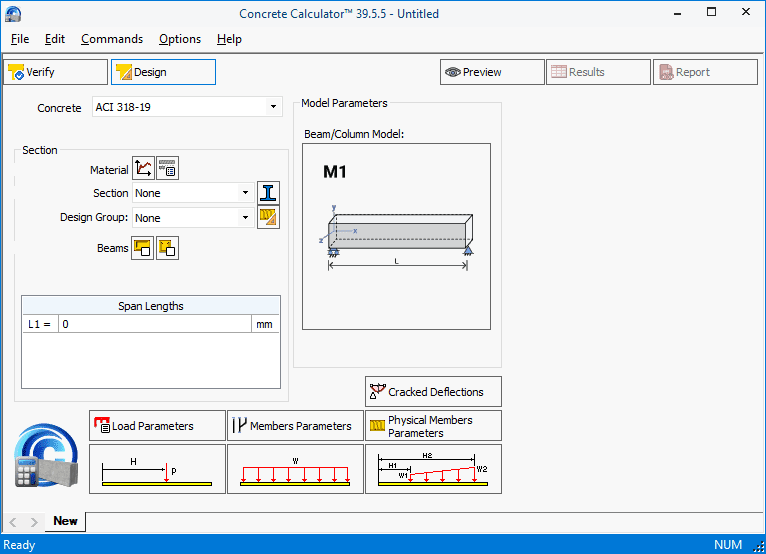
Concrete Calculator™ · Design results
SAFI Concrete Calculator showing a reinforced concrete member model, loads and design check results

Standalone, no 3D model

Design a single member or element without building a full structural model, or verify elements of a larger one.

Design codes built in

Checks follow the provisions of each US, Canadian and international design code supported by the calculator.

Automatic load combinations

Enter dead, live, wind, snow and seismic loads, and let the calculator build the load combinations.

Built-in libraries

Standard sections, materials and reinforcing bars, with room for your own custom entries.

Reports ready for review

Detailed and summary reports with graphical and numerical results, ready to print or add to your calculation package.

Technical support included

Every calculator subscription includes technical support from our engineering team.

Calculator or GSE™?

One Member or the Whole Structure? Choose the Right SAFI™ Tool

Calculators are made for quick checks of single members and elements. When you need to model, analyze and design a complete structure, GSE™ takes over.

Engineering calculators

One Member at a Time

Pick a model, enter dimensions and loads, and get the design checks for one beam, column, slab or footing.

Best for

  • Quick designs of single members and elements
  • Verifying elements of a larger model
  • Steel, wood or concrete checks without building a 3D model
Find your calculator
GSE™ software

The Whole Structure in 3D

Model, analyze and design complete structures in steel, concrete, wood and aluminum, all in the same model.

Best for

  • Buildings and industrial structures modeled in 3D
  • FEA, P-Delta and seismic analysis, including response spectrum and time-history
  • Multi-material design to US and Canadian codes in one program
Explore GSE™

Use both. Model the structure in GSE™, then check individual members quickly with a calculator.

Licensing

Simple Licensing for Every SAFI™ Calculator

Each calculator is sold as its own one-year subscription. Buy online, install it on your Windows PC and start designing.

Included with every calculator

One-year subscriptionLicensed per calculator, renewed yearly
Software licenseActivated with a product key
Technical supportFrom our engineering team
Windows PCDesktop software

How to get started

  1. Choose your calculator Wood, Steel, Slab or Concrete. Not sure? Use the calculator guide.
  2. Buy online Click Buy online on the calculator card and complete your order.
  3. Install and activate Install on your Windows PC and activate with your product key. Check the system requirements or the Licensing Support Center if you need help.