
Structural engineering software since 1986 Toll-free 1‑800‑810‑9454
Cart
0
SAFI™ - Structural Engineering Software
Cart
0

Licensing support

SAFI™ Licensing Support Center

Install, activate, update or transfer your SAFI™ software license, and find the solution to common licensing error codes in a few minutes.

  1. Check your Diagnostic LOG fileIt shows the error code behind your licensing issue.
  2. Find your issue belowMost licensing issues and error codes are documented step by step.
  3. Still stuck? Submit a ticketOur licensing team will help you, with your LOG file attached.

Start here

First Step: Check Your Diagnostic LOG File

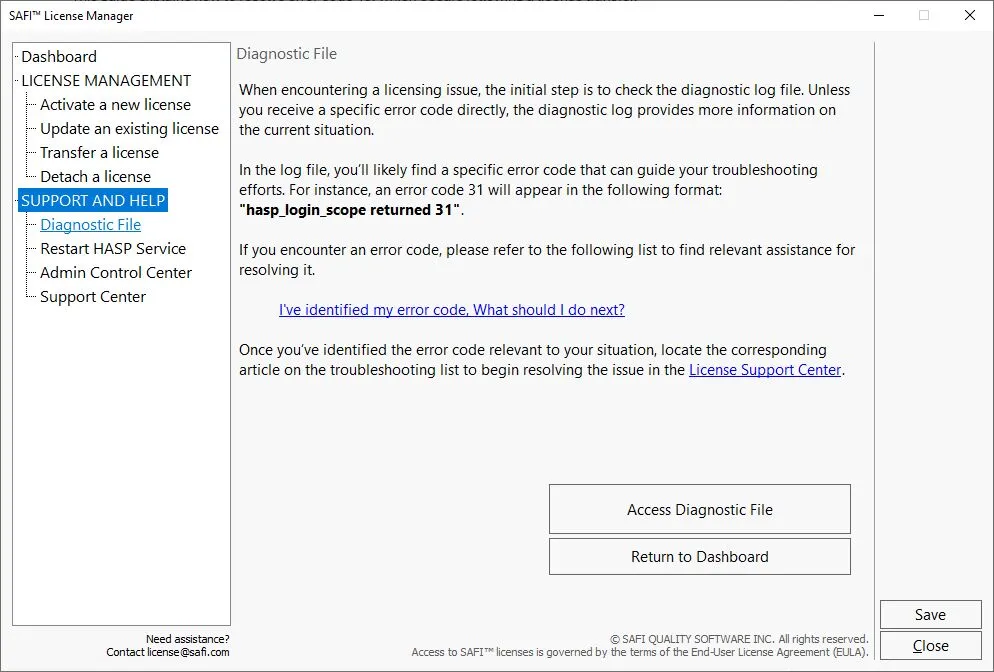
When you experience a licensing issue, start with the Diagnostic LOG file. It shows the specific error code behind the problem, so you can go straight to the right solution below.

  • When an error appearsThe program asks if you want to view the diagnostic log file. Click Yes.
  • From the License ManagerGo to Support & Help › Diagnostic File › Access Diagnostic File › Copy Diagnostic File.

Using a version prior to 39.5? See the full guide.

What to look for in the file hasp_login_scope returned 31

Pro tip: copy the diagnostic file and paste it into the SAFI™ AI Assistant, available 24/7. In many cases, finding the solution yourself is faster than waiting for a support agent.

SAFI License Manager Diagnostic File screen with the Access Diagnostic File button

Licensing guides

Licensing Troubleshooting Step by Step

Articles for the most common licensing questions, from installing and activating a license to fixing error codes and moving it to another computer.

Before contacting support

Most common issues are documented below. Please read all provided documentation carefully to resolve your issue as quickly as possible. In many cases, finding the solution yourself is more efficient than waiting for the next available support agent.

Licensing ticket

Still Need Help? Submit a Licensing Ticket

If the documentation above didn’t solve your issue, our licensing team will help you. Include the details below so we can resolve it on the first reply.

Have these ready

  • Your product key and License IDBoth are shown in the License Manager.
  • Your software versionFor example 39.5.
  • Your Diagnostic LOG fileHow to get it, then paste or attach it in the form.

Want an answer right now? Paste your Diagnostic LOG file into the SAFI™ AI Assistant, available 24/7.